
If you find that Your Aadhar Details are Wrong or have any mistake.
If Yes, Then you are in the right place.
In this tutorial, you will know all about Aadhaar SSUP Update.
SSUP (Self Service Update Portal) is an online service provided by UIDAI to self-update your information on Aadhar.
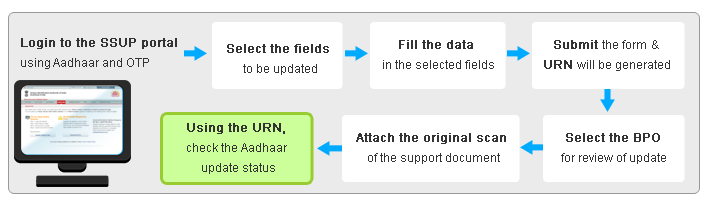
Aadhaar Self Service Update Portal is a platform provided by UIDAI to update or make a correction on Aadhaar card online.
Aadhaar Self Service Update Portal: SSUP
You can update your Aadhaar card by two method.
1. Aadhaar update online SSUP
2. Aadhaar update offline SSUP
Aadhaar Update Online: SSUP
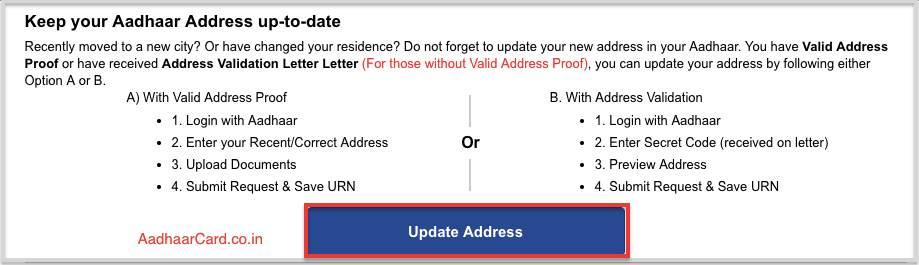
1. Visit UIDAI SSUP UPDATE section.
2. Click on Update Address.
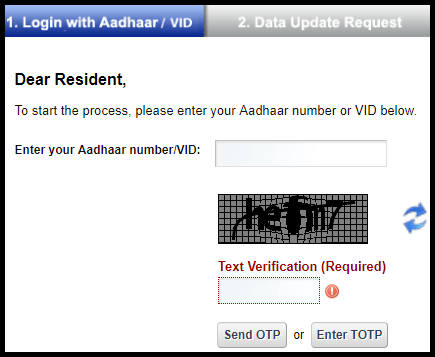
3. Enter your Aadhaar number or VID virtual Aadhaar ID.
4. Enter Text for verification as shown in box.
5. Click on Send OTP. Then you will receive OTP on your registered mobile number.
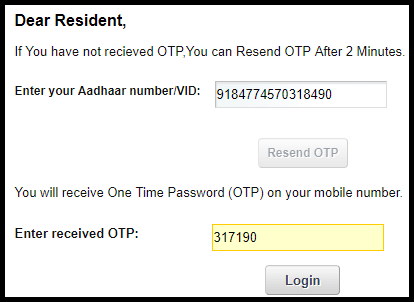
6. Or Click on enter TOTP.
NOTE: You can generate TOTP through the mAadhaar app.
7. Enter OTP or TOTP and Click on Login button.
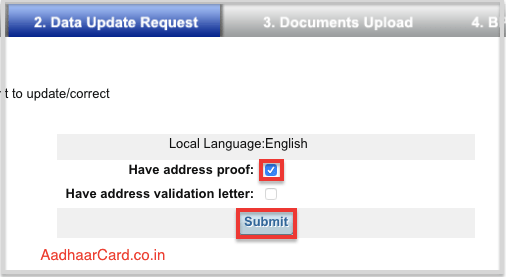
8. Select the relevant option through you want to update Aadhaar via SSUP portal.
9. Click on the Submit button.
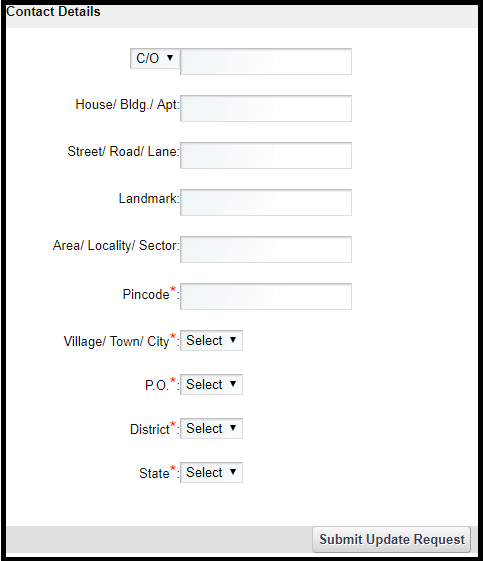
10. Enter correct information in SSUP update portal.
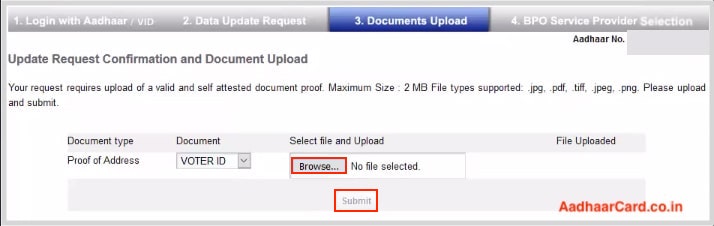
11. Recheck your information and click on Submit Update Request.
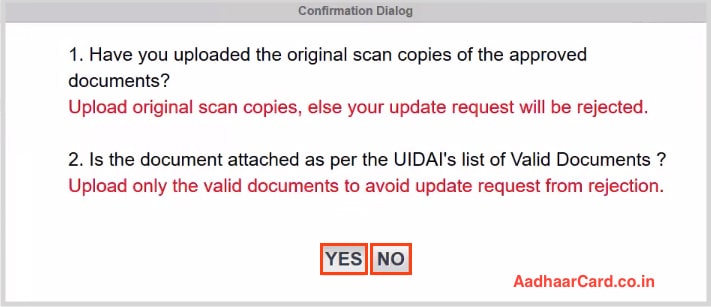
12. Browse your Valid Proof of Address from all the options and Click on Upload.
Select BPO Service Provider for Changing Address in SSUP Aadhar
13. Select YES or NO as per above questions.
14. Select the BPO Given on the Screen and Click on Submit.
Confirm Your Address Details in Aadhaar Card
15. Recheck your information and click on Proceed. Now a Message will appear “Update Request Complete” with the option to Download or Print your Update Request Number(URN).
Never forget to collect URN (Update Request number) as it helps in Checking Aadhaar status.
Once your Aadhaar information is updated you can download e-Aadhar easily through UIDAI website.
Aadhaar Update Offline: SSUP
Visit enrollment centre
You can change your demographics (Name, Address, DoB, Gender, Mobile & Email) and Biometrics (Finger Prints, Iris & Photograph) by visiting the nearest enrollment centre.
You need to carry your original documents for further requirements.
Step by step guide of Aadhar SSUP: Aadhaar Self Service Update Portal
#1. Fill the Aadhar correction form.
#2. Make sure you enter that information which is correct and not the one that is mentioned in your Aadhaar.
#3. Get self-attested copies of proofs validating your update request.
#4. Submit the form along with documents.
You can get all your details including your biometric data, image, mobile number, etc. updated at the enrolment centre.
FEE
Updating Aadhaar online and by post can be done free of cost. However, if you are visiting an enrollment centre for the correction/update, you need to pay a fee of Rs 25 every time you get your details updated.
Documents Required for Aadhar SSUP Update
Here is a List of Documents required to be Uploaded for Aadhar Verification Process.
Documents As Proof Of Address: SSUP
| Driving Licence ID |
|---|
| PASSPORT |
| PAN Card ID |
| Voter ID Card OF PERSON |
| Ration Card |
| Bank Statement or Passbook (ANY INDIAN BANK) |
| Electricity Bill OF HOME |
| Telephone Landline Bill |
| Insurance Policy |
| Water bill (Latest One) |
| Property Tax Receipt |
| Credit Card Statement |
| Get Signed Letter having Photo from Bank on letterhead |
| Signed Letter having Photo issued by registered Company on letterhead |
| Keep Signed Letter having Photo issued by Recognized Educational Instruction on letterhead |
| Arms License |
| Caste and Domicile Certificate having Photo issued by State Govt. |
| Disability ID Card/handicapped medical certificate issued by the respective State/UT Governments/Administrations |
| Passport of Parents (In case of Minor) |
| Freedom Fighter Card |
| CGHS / ECHS Card |
| Pensioner Card |
DOCUMENTS AS PROOF OF IDENTITY CONTAIN NAME AND PHOTO: SSUP
| Passport |
|---|
| PAN Card ID PROOF |
| Ration/ PDS Photo Card |
| Voter ID Card |
| Driving License |
| Arms License |
| Pensioner Photo Card |
| Disability ID Card |
| Handicapped medical certificate |
| NREGS Job Card |
| Freedom Fighter Photo Card |
| CGHS / ECHS Photo Card |
| Photo Credit Card |
| Kissan Photo Passbook |
PROOF OF RELATIONSHIP DOCUMENTS: SSUP
| Pension Card OF FAMILY HEAD |
|---|
| Passport |
| Army Canteen Card |
| Birth Certificate issued by Registrar at the time of Birth |
| MNREGA Job Card |
| CGHS/State Government/ECHS/ESIC Medical card |
LIST OF ALLOWED DOCUMENTS AS PROOF OF DATE OF BIRTH: SSUP
| Birth Certificate |
|---|
| PAN CARD |
| VOTER ID CARD |
| RATION CARD |
| DRIVING LICENCE |
| Passport |
| School card |
The Aadhaar Card is one of the most important identity documents in India, issued by the Unique Identification Authority of India (UIDAI). Sometimes, you may need to update or correct your Aadhaar details—whether it’s your address, name, gender, or date of birth. For such updates, UIDAI provides an easy-to-use platform called the Aadhaar Self Service Update Portal (SSUP).
What is Aadhaar SSUP?
The Aadhaar Self Service Update Portal (SSUP) is an online service provided by UIDAI that allows Aadhaar holders to update their demographic information (like name, address, mobile number, and more) without needing to visit an Aadhaar Seva Kendra. This portal allows for simple and convenient self-service updates directly from the comfort of your home.
With the SSUP, you can update various details, including:
- Address
- Name
- Gender
- Date of Birth
- Language Preference
For some changes (like biometrics or mobile number updates), you will still need to visit an Aadhaar Seva Kendra.
Eligibility for Aadhaar Update via SSUP
Before proceeding with an update request via SSUP, you need to make sure:
- Your Aadhaar is active.
- The update you’re making is related to demographic information (address, name, date of birth, gender, etc.).
- You have access to a mobile number registered with your Aadhaar (for OTP verification).
Steps to Update Aadhaar Using SSUP
Follow these simple steps to update your Aadhaar details online via the Aadhaar SSUP portal.
Step 1: Visit the Aadhaar SSUP Portal
- Open the UIDAI SSUP page: Aadhaar Self Service Update Portal (SSUP).
- Click on the “Proceed to Update Aadhaar” button.
Step 2: Enter Aadhaar Number
- On the next page, enter your 12-digit Aadhaar number in the provided field.
- Verify the captcha code (to ensure you’re not a robot).
- Click on Send OTP to receive an OTP on your registered mobile number.
Note: If your mobile number is not linked to your Aadhaar, you will need to visit an Aadhaar Seva Kendra to update it.
Step 3: Enter OTP
- Once you receive the OTP on your registered mobile number, enter it in the required field.
- Click on Submit to proceed.
Step 4: Choose the Details to Update
- After OTP verification, you’ll be directed to the Update Aadhaar Details page.
- Here, you can select which detail you wish to update. The options available include:
- Address
- Name
- Date of Birth
- Gender
- Language Preference
Note: Ensure the information you provide is correct. If you’re updating your address, you’ll need to upload proof of address as a supporting document.
Step 5: Upload Supporting Documents (if required)
- If you’re updating certain fields (like address or name), you will be prompted to upload supporting documents.
- Make sure the documents are in PDF/JPEG format and are legible.
- Proof of Address (for address change): Passport, bank statement, utility bills, etc.
- Proof of Identity (for name correction): Passport, PAN card, etc.
Step 6: Review and Confirm Changes
- Once you’ve entered all the required details and uploaded the supporting documents, carefully review your information.
- If everything looks correct, click on “Submit” to finalize your request.
Step 7: Acknowledgment Slip
- After submitting the update request, you will receive an Acknowledgment Slip with a Update Request Number (URN).
- Keep this URN safe, as you can use it to track the status of your Aadhaar update request.
How to Check the Status of Your Aadhaar Update?
To track the status of your update request:
- Visit the UIDAI Update Status Page: Check Aadhaar Update Status.
- Enter your URN (Update Request Number) and Aadhaar number.
- Click Check Status to see the progress of your Aadhaar update.
You will receive a confirmation SMS once your Aadhaar update is successfully processed.